
The Top 5 Mistakes People Make When Using GPS Trackers
In today’s world, GPS trackers have become more than just a convenience—they’re a necessity for protecting vehicles, monitoring fleets, and safeguarding valuable assets. From businesses that manage hundreds of deliveries a day to individuals who simply want peace of mind when parking their car, GPS tracking technology offers powerful benefits. But like any technology, its value depends on how well it’s used.
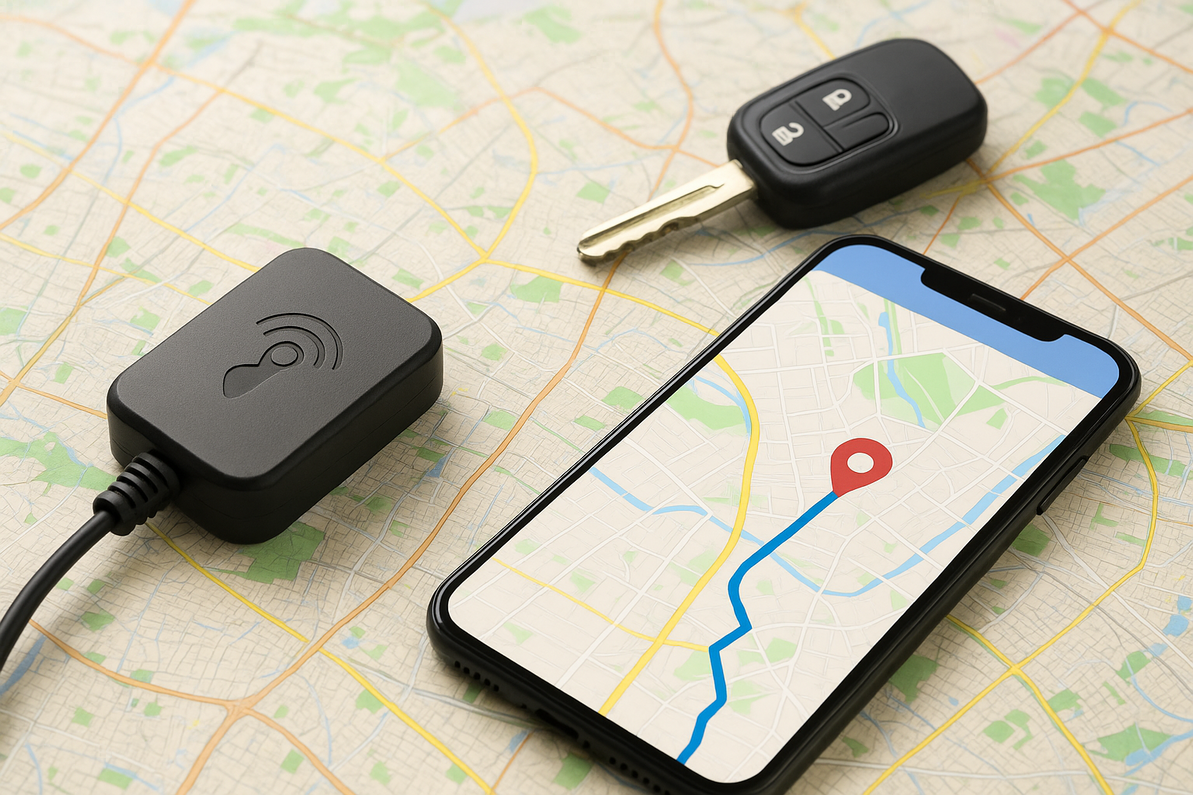
Before we dive into the common mistakes, let’s get the basics straight. What is a GPS tracker? Simply put, it’s a compact device that uses satellite signals to determine and share the exact location of a vehicle, asset, or person. While some people imagine bulky equipment, in reality, what do GPS trackers look like? Most are small, discreet devices that can fit in the palm of your hand, ranging from plug-and-play models to hardwired professional systems.
Understanding how does a GPS tracker work is equally important. It gathers location data from satellites and transmits it through cellular networks to a central platform, where users can track movements in real time or view reports later. This makes choosing the best GPS trackers crucial, depending on whether you need them for personal use, fleet management, or asset protection.
In this guide, we’ll uncover the top five GPS mistakes people make and, more importantly, show you how to avoid them for maximum performance.
Understanding GPS Trackers Before Diving Into Mistakes
Before exploring the most common GPS mistakes, it’s worth taking a moment to understand how these devices work and the different options available. A GPS tracker is designed to collect location data from satellites and transmit it through a network so users can monitor vehicles, assets, or people from anywhere. For anyone new to the technology, it helps to know the basics of how do GPS trackers work.
Most devices use satellite signals combined with cellular or wireless technology to transmit data. This allows users to access real-time information through an app or web dashboard. In simple terms, when you’re asking yourself how to use the GPS tracker, the answer is: install the device, connect it to the platform, and monitor movement, alerts, and reports from your phone or computer.
There are different types of GPS trackers, each designed for specific needs. For example:
- GPS asset trackers: Best for monitoring equipment, trailers, or valuable goods during transit.
- Real-time GPS trackers: Provide live location updates—ideal for businesses managing fleets or delivery services.
- Plug-and-play trackers: Easy for individuals who want simple vehicle monitoring.
- Hardwired fleet systems: Professional-grade solutions for long-term vehicle and driver tracking.
So, what do GPS trackers look like? Their appearance varies depending on the type. Some are small magnetic boxes that attach discreetly to a trailer or container, while others are plug-in devices for cars, and larger, rugged versions exist for industrial use.
If you’re unsure which one suits your needs, the best GPS trackers are those that match your purpose—whether that’s securing cargo, tracking personal vehicles, or managing an entire fleet. With the right choice, you’ll avoid unnecessary complications and set yourself up for success before installation even begins.
Mistake #1: Poor GPS Tracker Installation
One of the most common GPS mistakes people make is assuming that installing a tracker is as simple as sticking it anywhere in a vehicle or asset. While many devices are user-friendly, improper installation often leads to GPS issues, tracking issues, and errors in GPS data. If a tracker isn’t placed correctly, it may struggle to connect with satellites, deliver inaccurate information, or stop reporting altogether.
Why Installation Matters
GPS trackers rely on clear access to satellite signals. Hiding a device under heavy metal parts, deep inside dashboards, or near electronic interference can weaken performance. For example, installing a tracker beneath the hood or inside a glove compartment may result in inconsistent location updates. These errors in GPS can create unnecessary frustration—especially when reliable tracking is critical for security or fleet management.
Correct Installation Practices
For vehicle-based devices, the first step is to follow the manufacturer’s instructions carefully. If you’re wondering how to install a GPS tracker on a vehicle, placement is key. Plug-and-play models should connect directly into the OBD-II port for easy setup, while hardwired systems need professional installation to ensure secure wiring and reliable power. For GPS asset trackers, proper placement often means mounting the device on a flat surface with clear signal exposure and securing it to avoid tampering.
Examples of Poor Installation Problems
- Weak or no signal due to metal obstruction
- Frequent disconnections or delayed updates
- Incorrect power connections draining the battery
- Misaligned device orientation causing tracking issues
The Smart Way to Avoid This Mistake
To prevent installation errors, consider using trackers designed for simplicity, such as plug-and-play devices for personal vehicles or professional fleet trackers that come with installation support. Many modern real-time GPS trackers are designed with easy mounting options and come with software that alerts you if the device isn’t reporting correctly. Businesses managing large fleets or trailers often prefer durable asset trackers with strong magnets and weatherproof casings to ensure accuracy in challenging conditions.
In short, correct installation is the foundation of effective tracking. Getting it right from the start eliminates frustrating GPS issues and ensures your tracker delivers the reliable performance you expect.
Mistake #2: Choosing the Wrong Type of Tracker
Another major GPS mistake people make is selecting the wrong type of tracker for their needs. With so many options available, it’s easy to get caught up in flashy features or budget pricing, only to discover later that the device doesn’t deliver what you expected. This leads to wasted money, unnecessary GPS issues, and ultimately frustration.
Why the Right Tracker Matters
Not all trackers are built for the same purpose. Some are designed for live fleet monitoring, while others are meant for long-term asset protection. If you pick the wrong device, you may struggle with tracking issues like slow updates, missing data, or limited functionality. For example, someone managing a delivery business will need a real-time GPS tracker, not a basic device that only reports location a few times a day.
Comparing Types of GPS Trackers
- GPS Asset Trackers – Ideal for equipment, trailers, or valuable shipments that need security during transport. They usually have long battery life and rugged design.
- Real-Time GPS Trackers – Provide instant location updates, making them the best GPS trackers for fleet managers, delivery companies, or anyone who needs constant oversight.
- Plug-and-Play Trackers – Easy to use for individuals who want to monitor personal vehicles without complicated setup.
- Hardwired Fleet Trackers – Perfect for businesses that need durable, professional-grade tracking systems with advanced reporting.
Common Mistakes People Make
- Buying types of GPS trackers that don’t match their use case
- Choosing cheaper devices that lack accuracy or coverage
- Ignoring data reporting needs, like real-time vs. periodic updates
- Overlooking compatibility with vehicles or management software
The Smart Way to Choose
Before purchasing, ask yourself: Do I need live updates or just general location data? Am I tracking a single vehicle or a fleet? Do I need a rugged device for outdoor assets? Answering these questions ensures you choose the right category—whether it’s a real-time GPS tracker, a gps asset tracker, or one of the best GPS trackers designed for personal or business use.
The key takeaway? Don’t buy based on price or appearance alone. Matching your needs with the right types of GPS trackers will prevent future tracking issues and help you maximize the value of your investment.
Mistake #3: Ignoring Maintenance & Battery Care
Even the best GPS trackers can underperform if they aren’t properly maintained. A surprisingly common GPS mistake people make is installing a tracker and then forgetting about it until problems arise. Neglecting routine care often leads to frustrating GPS issues, errors in GPS, and unnecessary downtime.
Why Maintenance Matters
GPS trackers rely on consistent power and smooth data transmission. Over time, batteries degrade, software may become outdated, and physical devices can be damaged by weather or tampering. Without regular check-ups, users often experience tracking issues like delayed updates, weak signals, or devices that suddenly stop working altogether.
Common Problems from Poor Maintenance
- Dead or weak batteries – Especially for portable and gps asset trackers used on trailers or equipment.
- Outdated firmware/software – Leads to glitches, connectivity problems, and data delays.
- Damaged SIM cards or loose wiring – Causes frequent errors in GPS or device disconnections.
- Environmental wear and tear – Heat, rain, or dust can harm trackers that aren’t ruggedized.
Smart Maintenance Practices
- Battery Checks – Regularly monitor battery levels, especially for portable devices. Many modern real-time GPS trackers now send alerts when batteries are running low.
- Firmware Updates – Always keep devices updated to improve accuracy and fix bugs.
- Physical Inspections – Check installation points, wiring, or mounting brackets to ensure the device hasn’t shifted or been tampered with.
- Test Runs – Periodically test your tracker by monitoring trips or asset movements to confirm reporting accuracy.
The Right Tools Help
Fortunately, today’s advanced tracking systems make maintenance easier. Many solutions offer automatic low-battery alerts, remote software updates, and diagnostic reporting to prevent unexpected downtime. For businesses, this means fleet managers can spot potential tracking issues before they cause serious disruptions.
Ignoring simple maintenance is like installing a smoke alarm and never checking the batteries—it defeats the purpose of having it. Whether you’re using gps asset trackers for equipment or real-time GPS trackers for vehicles, routine care ensures your devices perform reliably when you need them most.
Mistake #4: Overlooking Data & Alerts
Another frequent GPS mistake is installing a tracker and then barely using the data it provides. Many people assume that simply knowing where a vehicle or asset is located is enough. In reality, ignoring notifications, reports, and alerts is one of the biggest reasons users face unnecessary GPS issues and tracking issues.
Why Data & Alerts Are Important
Modern GPS devices—especially real-time GPS trackers—do much more than just show a dot on a map. They record speed, routes, stop durations, battery levels, and even tampering attempts. For businesses, this data can improve fuel efficiency, optimize routes, and enhance driver accountability. For individuals, alerts can notify you if a car moves without permission or if an asset leaves a designated area.
When users fail to set up or review these alerts, they miss out on early warning signs of errors in GPS or potential theft. For example, a stolen trailer with a tracker may not be recovered quickly if the owner never activated movement alerts.
Common Mistakes with Data Usage
- Not enabling real-time notifications for unauthorized movement
- Ignoring geo-fencing tools that alert when assets leave safe zones
- Overlooking detailed trip and speed reports
- Forgetting to check device health alerts (low battery, weak signal)
How to Use Data Effectively
- Set Up Notifications – Configure alerts for movement, speeding, unauthorized use, or leaving pre-set boundaries.
- Review Reports Regularly – Weekly or monthly analysis helps identify patterns and prevent misuse.
- Leverage Software Dashboards – Use the platform’s reporting tools to optimize routes, reduce costs, and improve efficiency.
- Stay Alert to Device Health – Respond quickly to low-battery warnings or connectivity notices.
Smart Solutions for Smarter Tracking
Advanced gps asset trackers and real-time GPS trackers now come with built-in data analytics and customizable alerts. These features allow both individuals and fleet managers to take proactive action rather than reacting after a problem occurs. Businesses that actively use these insights often save money, increase security, and extend the life of their equipment.
Simply put, overlooking data is like ignoring a car’s dashboard warning lights. If you want to prevent tracking issues and get the most value from even the best GPS trackers, you need to pay attention to the information your device provides.
Mistake #5: Misunderstanding How GPS Works
Perhaps the most overlooked GPS mistake people make is not understanding how the technology itself functions. Many users expect a tracker to work flawlessly under all conditions, only to be frustrated when GPS issues or tracking issues arise. Knowing how does a GPS tracker works helps set realistic expectations and prevents confusion.
The Basics of GPS Functionality
At its core, a GPS tracker receives signals from multiple satellites orbiting the Earth. It then calculates its location and transmits that data through cellular or wireless networks to a software platform or mobile app. While this may sound straightforward, real-world conditions can cause errors in GPS. For example, signals may weaken inside tunnels, dense forests, parking garages, or areas surrounded by tall buildings.
When users don’t understand these limitations, they may mistakenly believe their device is defective. In reality, these occasional disruptions are normal for even the best GPS trackers.
Common Misunderstandings
- Expecting 100% accuracy at all times, even in blocked environments
- Believing trackers don’t need cellular coverage for real-time updates
- Confusing types of GPS trackers (thinking all devices provide live tracking)
- Assuming no setup or learning curve is needed for how to use GPS tracking device effectively
How to Avoid This Mistake
The key is education. Before installation, learn how GPS trackers work, what factors affect accuracy, and how to troubleshoot minor disruptions. If you’re using a gps asset tracker, understand that some models are designed to report less frequently to save battery. Meanwhile, real-time GPS trackers may consume more power but provide constant updates.
Many advanced systems now include built-in troubleshooting tools, low-signal alerts, and even training resources to help users get the most from their devices. For businesses, onboarding employees with simple guides on how to use the GPS tracker or dashboard software can prevent unnecessary frustration later.
The Bottom Line
Understanding how does a GPS tracker work is essential for avoiding disappointment. Recognizing the difference between normal signal disruptions and actual malfunctions will save time, money, and stress. With the right expectations—and by choosing from the best GPS trackers that match your needs—you’ll minimize errors in GPS and maximize performance.
FAQs About GPS Trackers

1. What do GPS trackers look like?
GPS trackers come in many shapes and sizes, depending on their use. Some are small plug-and-play devices that fit into a car’s OBD-II port, while others are rugged gps asset trackers with weatherproof casings designed for outdoor use. Portable versions may be as small as a matchbox, while fleet systems can be slightly larger but remain discreet.
2. How do GPS trackers work in vehicles and assets?
At a basic level, trackers gather location data from satellites and send it through cellular or wireless networks to a monitoring platform. This allows users to view real-time locations, route history, and alerts. Real-time GPS trackers provide instant updates, while other models conserve power by reporting at intervals.
3. What is the best way to install a GPS tracker on a vehicle?
Correct installation is key to avoiding GPS issues. Plug-and-play models connect directly to the OBD-II port, while hardwired devices may require professional setup to ensure reliable power. If you’re wondering how to install a GPS tracker on a vehicle, always follow the manufacturer’s guide and place the device where it won’t be blocked by metal parts.
4. What are the most common GPS issues people face?
Users often report tracking issues such as delayed updates, weak signals, or sudden disconnections. These are usually caused by poor installation, low batteries, or environmental factors like tunnels and tall buildings.
5. Which are the best GPS trackers for fleets or personal use?
The best GPS trackers depend on your needs. For personal cars, plug-and-play models are ideal. For businesses, real-time GPS trackers and asset trackers offer advanced reporting, theft alerts, and durable designs for trailers or equipment.
Wrapping Up
Using GPS technology can transform the way you protect vehicles, manage fleets, and safeguard valuable assets—but only if you avoid the most common GPS mistakes. From poor installation to choosing the wrong device, ignoring maintenance, overlooking alerts, and misunderstanding how the technology works, these errors can lead to unnecessary GPS issues, tracking issues, and errors in GPS data.
The good news is that these problems are easy to prevent. By selecting the best GPS trackers for your needs—whether that’s rugged GPS asset trackers, professional-grade fleet systems, or real-time GPS trackers—and following smart practices like proper installation, routine care, and active monitoring, you can ensure reliable and accurate tracking.
Ultimately, the right device combined with the right habits gives you more than just location data—it gives you peace of mind. Whether you’re securing cargo, tracking a personal car, or managing an entire fleet, making informed choices will help you get the full value from your tracking system and avoid the mistakes that hold many users back.
Recent Posts
-

How to Choose Between a standalone GPS tracker and a GPS phone app
You’re trying to track something important, and the options feel deceptively simple. Do you buy a de …Jan 23rd 2026 -
The Pros and Cons of GPS Trackers with Real-Time Tracking
Real-time tracking in vehicle and asset monitoring means the location of a car, truck, or piece of e …Jan 16th 2026 -

Using GPS Trackers to Monitor Employee Performance
Field teams, drivers, and mobile crews are often the face of your business. They meet customers, del …Jan 5th 2026