

How to Set Up Geofencing with Your GPS Tracker
Imagine knowing instantly when your car leaves your driveway or a delivery van enters a restricted zone. That's the power of geofencing—an advanced feature that turns a standard GPS tracker into a smart security and management tool. For individuals and businesses alike, geofencing is no longer a luxury; it's becoming an essential part of asset monitoring and vehicle tracking.
But what exactly is geofencing? In simple terms, it's the creation of a virtual boundary—or “fence”—around a specific geographic area. When a GPS-enabled device crosses that boundary, the system automatically sends notifications called geofence alerts. Whether you're securing a personal vehicle, fleet tracking, or safeguarding equipment on job sites, these alerts provide real-time oversight and peace of mind.
In this guide, we'll walk through how to set up geofencing with your GPS tracker step by step. Along the way, we'll explore the benefits of geofencing, its applications in cars and businesses, and answer common questions like “how much does geofencing cost?” and “what is geofence alerts?”.
By the end, you'll not only know how to set up a geofence but also how to use it strategically—whether for personal safety, theft prevention, or operational efficiency.
What is Geofencing?
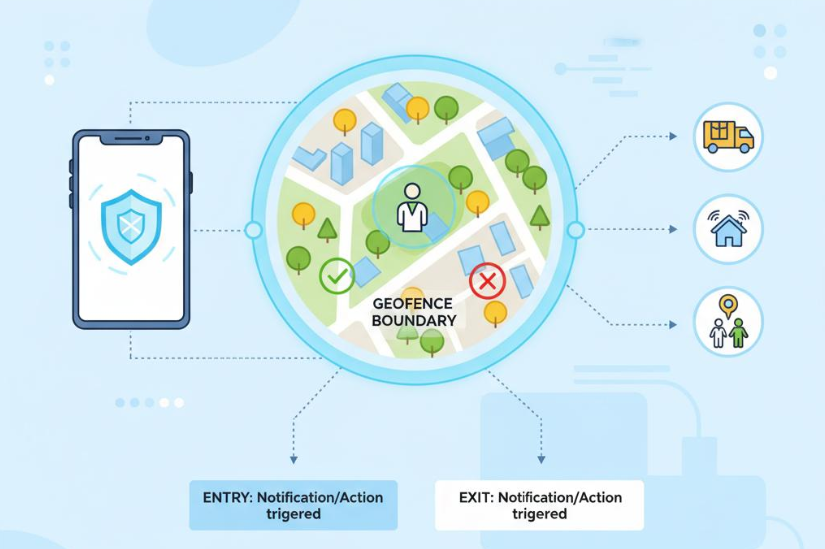
At its core, geofencing is the creation of a virtual perimeter around a physical location. Think of it as drawing a digital boundary on a map. Once this boundary is set, your GPS tracker will trigger geofence alerts whenever the tracked asset enters or exits the defined zone.
So, what is geofencing used for? The applications are wide-ranging. Families use it to receive a geofence alert in the car when teenagers drive beyond approved areas. Logistics companies rely on geofencing in cars and trucks to confirm timely arrivals at customer sites. Construction firms place digital fences around job zones to monitor when expensive equipment leaves the site. Even small businesses use geofencing services to keep track of employee routes or ensure company vehicles remain within service territories.
How GPS Geofencing Works
Geofencing relies on GPS technology. A geofence GPS tracker continuously compares its location against the virtual boundaries defined in your tracking software. If the tracker crosses the boundary, the system automatically sends a notification to your mobile app, email, or dashboard. These alerts can be customized for specific times, asset types, or users—turning raw location data into actionable intelligence.
For example, a GPS tracker geofencing feature can notify a fleet manager if a delivery van takes an unauthorized detour or if equipment leaves a warehouse outside business hours. These geofence alerts transform traditional GPS tracking from passive monitoring into proactive oversight.
Why Geofencing Matters
Unlike standard GPS tracking that only shows “where,” geofencing adds the “when and why.” It helps you enforce rules, improve security, and streamline operations. From preventing theft to reducing fuel waste, the benefits of geofencing extend far beyond simple location tracking.
Whether you're a parent, a business owner, or a fleet manager, geofencing gives you visibility and control that traditional oversight methods can't match. It's not just about seeing where something is—it's about knowing when something happens, and responding instantly.
How Do Geofence Alerts Work?
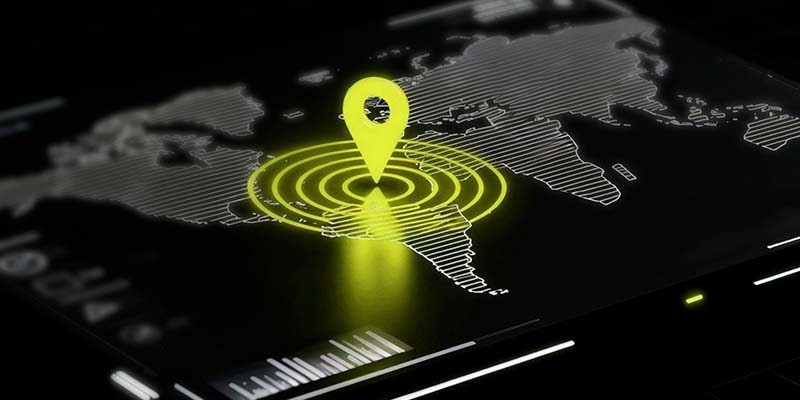
A geofence alert is the real-time notification you receive when a tracked vehicle or asset enters or exits a virtual boundary you've created. These alerts are at the heart of GPS tracker geofencing, turning simple tracking into active oversight.
The Process Behind Geofence Alerts
When you set up a geofence in your GPS tracking software, the system draws a digital boundary—often a circle or polygon—around the chosen area. The geofence GPS tracker then continuously checks its current position against this boundary. As soon as it detects movement across the line, the system sends a geofence alert to your dashboard, app, or even as an SMS or email.
These alerts can be configured for different needs:
- Entry alerts – Trigger when a vehicle enters a specific zone.
- Exit alerts – Notify you the moment something leaves the area.
- Time-based alerts – Activate only during certain hours, such as overnight monitoring.
Why Alerts Matter
Geofence alerts add a proactive layer of security and efficiency. Instead of constantly checking a live map, you can rely on smart notifications that highlight exceptions. For businesses, this means faster responses to unauthorized use or delays. For individuals, it means peace of mind knowing that vehicles and equipment are exactly where they should be.
In short, what is geofence alerts? They are the instant signals that turn geofencing into a practical safeguard—helping you act quickly, whether for personal security, operational control, or theft prevention.
Benefits of Geofencing
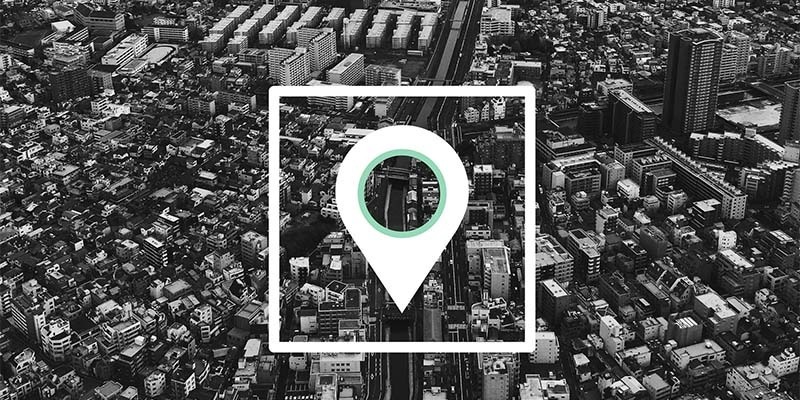
While GPS tracking alone shows you where an asset is, geofencing takes it a step further by creating actionable intelligence. By defining digital boundaries and receiving geofence alerts, you gain real-time visibility, tighter control, and added layers of security. Here are some of the most important benefits of geofencing.
1. Stronger Security
Theft prevention is one of the most common use cases. A geofence GPS tracker immediately notifies you if a vehicle or piece of equipment leaves a designated zone without authorization. Compact, water resistant GPS trackers make it possible to discreetly monitor equipment and recover assets quickly if they are moved without authorization.
2. Operational Efficiency
For businesses, geofencing vehicle tracking provides accountability and efficiency. Fleet managers can monitor entry and exit times at customer sites, reduce unauthorized stops, and optimize routing. These improvements save fuel, reduce idle time, and increase customer satisfaction.
3. Compliance and Oversight
Companies that rely on field services or regulated transportation can use geofencing solutions to maintain compliance. For example, delivery fleets may set up geofences around restricted zones to ensure drivers don't enter them.
4. Smarter Resource Management
By tracking when and where assets move, managers can redeploy underutilized vehicles or equipment to where they're needed most. Geofencing services also allow businesses to monitor working hours and reduce unnecessary wear and tear.
5. Peace of Mind
For individuals, geofencing isn't just about logistics—it's about confidence. Knowing that GPS tracker geofencing will alert you to unusual movement means you can respond quickly and avoid costly losses.
How Much Does Geofencing Cost?
One of the most common questions people ask when considering GPS-based tracking is: how much does geofencing cost? Geofences are included in the monthly fee associated with the tracker you buy.
Hardware Costs
Most GPS trackers with geofencing capabilities range from $50 to $250 per device. A geofence GPS tracker designed for vehicles may cost slightly more, especially if it includes advanced features like engine diagnostics, tamper alerts, or real-time updates.
Software and Subscription Fees
Beyond hardware, the cost of geofencing is often tied to subscription fees for the tracking software. These typically range between $10 and $40 per month per device, depending on the provider. This subscription covers access to the platform, real-time tracking, and advanced features like geofence alerts and reporting.
Some providers bundle geofencing solutions into their standard package, while others treat them as a premium add-on. It's important to compare options so you're not paying for features you don't need.
Business vs. Personal Costs
- Personal use: For families monitoring a single car, a basic geofence alert in car setup with low monthly fees is often enough.
- Business use: Companies that need geofencing vehicle tracking across a fleet may face higher upfront costs but gain larger savings in fuel, compliance, and theft prevention.
Additional Services
If you require integration with geofence software, API support, or advanced geofencing services such as compliance tracking or analytics, costs can increase. Enterprise-level systems may run several hundred dollars per month, but they deliver advanced control that smaller solutions can't match.
Balancing Cost and Value
While some may focus only on the cost of geofencing, it's important to weigh it against the benefits of geofencing. Preventing the loss of even one vehicle or piece of equipment can easily outweigh years of subscription fees.
Step-by-Step Guide: How to Set Up Geofencing with Your GPS Tracker
Setting up geofencing may sound technical, but modern GPS platforms make the process surprisingly simple. Whether you're protecting a family car or managing a fleet, here's a complete guide on how to set up geofencing with your GPS tracker.
Step 1: Choose the Right GPS Tracker
Not all GPS devices come with geofencing capabilities. Look specifically for a geofence GPS tracker or confirm with the provider that their platform supports GPS tracker geofencing.
- For personal use, such as geofencing in cars, a plug-and-play OBD device or magnetic tracker works well.
- For business use, look into geofencing vehicle tracking devices with added features like real-time alerts and driver behavior monitoring.
Step 2: Access the Tracking Platform or App
Once your GPS tracker is installed and activated, log in to the tracking platform or mobile app that comes with your device. This is where you'll view real-time location data, create geofences, and manage your geofence alerts.
When you log in, look for settings such as:
- Geofencing
- Safe Zones
- Boundaries
- Alerts
These terms may vary depending on your provider's geofence software.
Step 3: Define Your Geofence
This is the heart of the process. A geofence is simply a digital perimeter drawn on a map.
- Select the area where you want to monitor activity.
- Draw a circle, polygon, or rectangle around the desired zone.
- Name the geofence (e.g., “Home,” “Office,” “Warehouse”).
For families, setting up a geofence alert in a car around a neighborhood or school zone ensures quick notifications if the vehicle goes outside its normal routes. For businesses, geofencing solutions can mark delivery areas, no-go zones, or customer sites.
Step 4: Customize Alert Preferences
After you've created the boundary, decide what kind of geofence alerts you want to receive:
- Entry Alerts – Notify you when a vehicle or asset enters the zone.
- Exit Alerts – Triggered when the vehicle leaves the zone.
You can usually choose to receive notifications by SMS, email, or push notification.
Step 5: Test the Geofence
Before relying on it, test the system:
- Drive or move the tracker-equipped vehicle in and out of the geofence.
- Verify that the geofence alerts notification works as expected.
- Adjust the geofence size if alerts trigger too frequently or not at all.
Testing ensures your setup matches your real-world needs.
Step 6: Scale and Manage Multiple Geofences
As your needs grow, you may want more than one boundary. For instance:
- Families can set up GPS geofencing zones for home, school, and work.
- Businesses can create geofencing services across multiple warehouses, routes, or customer delivery zones.
Most platforms allow you to manage dozens of geofences simultaneously. Just be sure to label them clearly for easy monitoring.
Step 7: Analyze and Optimize
Geofencing isn't just about alerts—it's also about insights. Many platforms include geofence software reporting tools that show:
- Time spent in each zone
- Frequency of zone entry/exit
- Route deviations
This data can reveal patterns, optimize routes, and highlight opportunities for better efficiency.
Step 8: Integrate with Other Systems
Advanced businesses often integrate geofencing solutions with payroll, dispatching, or compliance systems. For example, a delivery company might automatically log arrival times when a vehicle enters a customer's geofence.
Pro Tips for a Smooth Setup
- Keep geofences specific, not too broad. Large zones can lead to alert fatigue.
- Always review your geofencing services plan to avoid unnecessary costs for unused features.
- For beginners wondering how to geofencing efficiently, start with one or two zones before scaling.
By following these steps, you'll transform your GPS tracker from a simple location tool into a proactive geofencing vehicle tracking solution. Whether for personal safety, business operations, or peace of mind, geofencing gives you real-time control over your assets.
Common Mistakes to Avoid When Setting Up Geofencing
While geofencing is a powerful feature, many users run into problems that limit its effectiveness. If you're learning how to set up geofencing, avoid these common mistakes to ensure your system runs smoothly.
1. Creating Oversized or Undersized Zones
A geofence that covers an entire city won't help you track precise movement, while a tiny boundary may miss entries or exits due to GPS drift. Whether it's for geofencing in cars or personal devices, always test the size of your geofence before relying on it.
2. Ignoring Alert Settings
Some users turn on every possible notification, leading to geofence alert fatigue. If you're constantly bombarded by unnecessary geofence alerts, you'll be more likely to miss the critical ones. Instead, customize alerts so they align with your needs—for instance, a geofence alert in car only when a vehicle leaves city limits.
3. Forgetting to Update Geofences
Businesses often change delivery routes or job sites, but fail to update their geofence GPS tracker settings. Outdated geofences result in inaccurate data and missed opportunities. Regularly review your zones to ensure they still match your real-world operations.
4. Overlooking Integration
A lot of businesses buy GPS trackers without checking whether the platform integrates with their existing tools. Missing out on integrations—like payroll systems, fleet management apps, or compliance software—means you don't get the full value of your GPS tracker geofencing setup.
5. Not Training Users
Even the best geofencing solutions are useless if employees, drivers, or family members don't know how they work. Taking time to explain what geofence alerts mean, why they matter, and how to respond ensures maximum effectiveness.
6. Treating Geofencing as “Set and Forget”
Geofencing isn't a one-time setup. Without regular monitoring and adjustments, its accuracy and usefulness decline. Whether for geofencing vehicle tracking in fleets or protecting personal property, schedule periodic checkups of your system.
By avoiding these pitfalls, you'll unlock the full potential of geofencing—turning it from a simple GPS tool into a smart system that provides real security, efficiency, and peace of mind.
Final Thoughts
Geofencing is no longer just a high-tech concept—it's a practical solution for everyday users and businesses alike. From geofence alerts that protect your car to advanced geofencing services that optimize fleets, the technology delivers real-world results.
Whether you're asking how to set up geofencing, exploring the cost of geofencing, or simply curious about what is geofencing used for, this guide gives you the tools and insights to get started.
By combining a reliable geofence GPS tracker with smart geofencing solutions, you can improve safety, boost efficiency, and enjoy peace of mind.
Recent Posts
-

How to Choose Between a standalone GPS tracker and a GPS phone app
You’re trying to track something important, and the options feel deceptively simple. Do you buy a de …Jan 23rd 2026 -
The Pros and Cons of GPS Trackers with Real-Time Tracking
Real-time tracking in vehicle and asset monitoring means the location of a car, truck, or piece of e …Jan 16th 2026 -
Using GPS Trackers to Monitor Employee Performance
Field teams, drivers, and mobile crews are often the face of your business. They meet customers, del …Jan 5th 2026