
OBD-II GPS Vehicle Tracker Installation Guide
OBD GPS Tracker Installation Guide
Learn how to install an OBD GPS tracker in minutes, where to find the vehicle’s diagnostic port, and when a plug-in tracker is the right fit for fleet vehicles, service trucks, and company cars.
Simple GPS Tracking Installation for Fleet Vehicles
An OBD GPS tracker installs by plugging directly into the vehicle’s OBD-II diagnostic port. There is no hardwiring, no battery charging routine, and no complex setup. For many fleet managers, this is the fastest way to begin tracking cars, pickup trucks, vans, and light-duty service vehicles.
Comparing installation options? Visit our complete GPS tracker installation guide hub, compare battery vs. wired GPS trackers, or review our hardwired GPS tracker installation guide and battery-powered GPS asset tracker installation guide.
How Do You Install an OBD GPS Tracker?
An OBD GPS tracker installs by plugging directly into the vehicle’s OBD-II port, which is usually located under the dashboard near the steering column. No tools or wiring are required, and installation typically takes less than one minute. Once plugged in, the device powers on and begins reporting location and vehicle data.
This makes OBD trackers a strong fit for service fleets, leased vehicles, temporary installs, and businesses that want a fast deployment across multiple vehicles.
When Should You Use an OBD GPS Tracker?
OBD GPS trackers are ideal when fast installation, simple deployment, and portability matter most. They are commonly used in service fleets, sales fleets, leased vehicles, and company cars where a business wants reliable vehicle tracking without a hardwired install.
They are especially useful when devices may need to be moved between vehicles or when a company wants to begin tracking immediately without taking vehicles out of service for installation work.
Benefits of OBD GPS Trackers
Fast Installation
Plug-in installation takes only a minute or two in most vehicles, with no tools required.
No Hardwiring
There is no need to splice wires or connect power manually, which simplifies deployment.
Portable Between Vehicles
OBD trackers can be removed and moved to another compatible vehicle with very little effort.
Ideal for Fleets
Deploy tracking across fleets quickly without scheduling lengthy installs.
For fast plug-and-play installation, devices like our OBD GPS tracker can be deployed in seconds without tools or wiring.
Step-by-Step OBD GPS Tracker Installation
Ready to install? Follow these simple steps to get your OBD GPS tracker up and running in minutes.
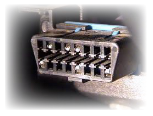
- Park the vehicle safely. Make sure the vehicle is in a safe location and powered off before beginning installation.
- Locate the OBD-II port. In most vehicles, the port is under the dashboard on the driver’s side near the steering column.
- Plug in the OBD GPS tracker. Align the connector with the diagnostic port and insert the tracker firmly.
- Start the vehicle if needed. Some devices power immediately, while others fully initialize once the vehicle ignition is on.
- Check the indicator lights. LED lights can confirm that the device has power, GPS signal, and cellular connectivity.
- Verify reporting in the platform. Log into your Tracker Systems account and confirm that the vehicle appears and reports normally.
Most plug-in GPS trackers can be installed in under a minute, making them one of the fastest ways to deploy fleet tracking without scheduling a professional installer.
Where Is the OBD-II Port Located?
The OBD-II port is typically located under the dashboard on the driver’s side, near the steering wheel or steering column. In some vehicles, it may be slightly left or right of center, but it is usually accessible without removing trim panels.
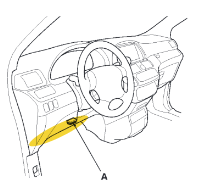
If you cannot find the port immediately, check the lower dashboard area near the pedals or consult the vehicle owner’s manual. Most cars and light trucks manufactured after 1996 include a standard OBD-II diagnostic port.
Vehicle Compatibility
Most cars and light-duty trucks manufactured after 1996 are equipped with an OBD-II diagnostic port. That makes OBD GPS trackers compatible with a large percentage of fleet vehicles on the road today.
Before installation, confirm that the vehicle has an accessible OBD-II port and enough clearance for the tracker. If the port location is obstructed or the vehicle is not a good fit for a plug-in device, a hardwired GPS tracker may be the better option.
OBD GPS Tracker Troubleshooting
No Power
Make sure the tracker is fully seated in the port. Remove and reinsert it firmly to ensure a proper connection.
No Location Reporting
Check that the vehicle is outdoors or has clear GPS visibility. Garages and covered areas can delay GPS lock.
No Cellular Communication
Verify that the vehicle is in an area with cellular coverage and that the device is active in your account.
Device Not Showing in Platform
Confirm that the tracker has been assigned correctly and that the account setup is complete inside the tracking platform.
Why Is My GPS Tracker Not Reporting?
If your OBD GPS tracker is not reporting, first check that it is fully plugged into the OBD-II port and receiving power. Then verify GPS visibility, cellular signal, and account activation. LED lights on the device can also help confirm whether the tracker has power, GPS lock, and network communication.
Related Installation Guides & Resources
Frequently Asked Questions
How long does it take to install an OBD GPS tracker?
Most OBD GPS trackers install in less than one minute. Simply locate the OBD-II port under the dashboard and plug in the device.
Do I need tools to install an OBD GPS tracker?
No. OBD GPS trackers are designed for plug-and-play installation and typically do not require tools, wiring, or professional installation.
Where is the OBD-II port on a vehicle?
The OBD-II port is usually located under the dashboard on the driver’s side near the steering column. In some vehicles, it may be slightly left or right of center.
Will an OBD GPS tracker work on every vehicle?
Most cars and light-duty trucks made after 1996 have an OBD-II port, but compatibility and port accessibility should always be confirmed before installation.
Can an OBD GPS tracker be removed and moved to another vehicle?
Yes. One of the main benefits of an OBD GPS tracker is that it can usually be unplugged and moved between compatible vehicles quickly and easily.
When is a hardwired tracker a better choice than an OBD tracker?
A hardwired GPS tracker may be a better option when a business wants a more concealed installation, needs tracking in vehicles where the OBD port is not practical, or wants to reduce the visibility of the tracking device.